Radar & HUD · 9 min read · 2026-09-16
War Thunder Radar and HUD Tools Guide
Set up the War Thunder radar, gun ballistics, aim prediction, map markers and damage indicator so you always know where the battle is going.
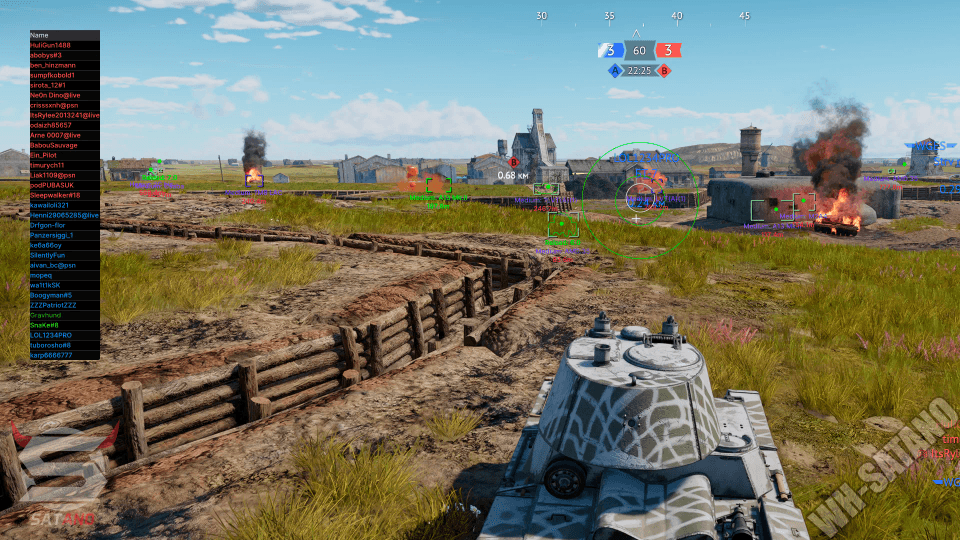
Why HUD tools matter in War Thunder
Most War Thunder deaths are information gaps — the flanking light tank, the aircraft already lining up, the SPAA you never spotted. The HUD module closes that gap without touching your aim.
Start from a preset (arcade, realistic or hardcore) and then adjust. Presets keep you from enabling forty indicators at once and losing your screen.
Radar and map awareness
The extended radar with direction indication tells you where contacts are relative to your hull, which is the fastest way to avoid getting flanked while you are scoped in.
Map aircraft markers, map ground markers and map projectile markers turn the minimap into a live picture of the battle instead of a guess.
Ballistics and aim prediction
Show Gun Ballistics draws the predicted impact point, which makes long shots and shooting over cover far more reliable.
Aim Prediction and the air-to-air aim indicator handle deflection, and Show Bomb Sight matters if you play strike aircraft.
Show Outline while aiming and Show Tank Distance in scope are small quality-of-life wins that never look suspicious.
Warnings and cameras
Damage Indicator shows incoming damage direction, and Show Enemy Aim Warning tells you when someone is already aiming at you — back off before the shot.
Camera unlocks (third person, artillery camera, virtual views) and Free Camera are strong for scouting but the most visible on replay. Use them sparingly and read the Stream-proof guide before you record.
Ready for War Thunder Cheats?
Check the live load status, then buy player ESP, modules ESP, wallhack chams and silent aim for War Thunder on warthundercheats.xyz. Need help? Read War Thunder Cheats support or player reviews. Own the game via warthunder.com.